
Alphabetize Your Favorites (menu)
MalwareBytes is GeekDrop's Favorite Anti-Malware Solution
Act now to get a huge savings on GeekDrop's favorite Backup, Imaging, & Drive Utilities. Also our member's #1 choice!

Wed, 07/07/2010 - 9:25am (16 years 16 weeks ago)



Ever want to alphabetize your favorites menu ? Here's how.
Internet Explorer 7 & 8
Click on favorites, then right click any folder or link. When the menu pops up choose "Sort by Name".

Firefox
Go to View, Sidebar, then Bookmarks
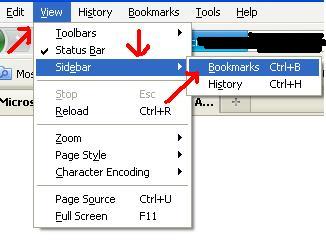
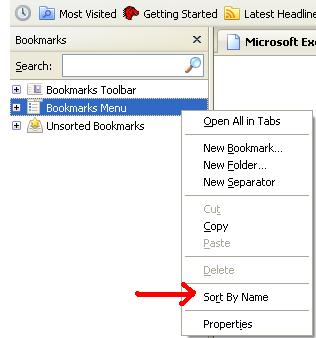
Now in your sidebar you see Bookmarks Menu. Right-click on that and choose "Sort by Name".
Google Chrome
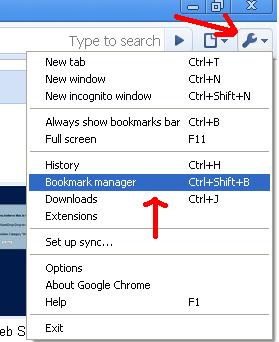
At the very right of your page at the top click on the little wrench. Click on Bookmark Manager.
At the very right of your page at the top click on the little wrench. Click on Bookmark Manager.
Hit the Organize drop down arrow and then choose "Reorder by title".
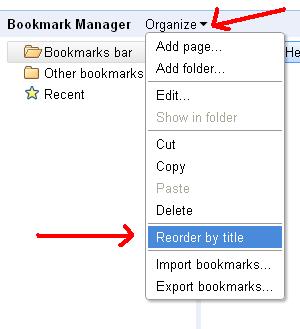
Now all your favorites are organized in alpha order 
Read More ...
- How Do I Remove / Delete the Adobe "Creative Cloud Files" Folder?
- How can I run multiple programs with one shortcut (for games)?
- How to remove programs from "Open With" list in Windows?
- Create a Shortcut to Windows Disk Cleanup
- How To Use Tor With Internet Explorer (IE) Web Browser (With Polipo) For Beginners
- How To Use Tor With Internet Explorer (IE) Web Browser (With Privoxy) For Beginners
- How can I disable explorer folders expanding in windows 7?
- Minimize All Windows At Once
- Using IE8? Your at risk
- Keyboard Shortcuts

- 4206 reads

Who's New


Wellington Florida
Married