
How To Stop Your Mouse From Waking Up Your Computer
MalwareBytes is GeekDrop's Favorite Anti-Malware Solution
Act now to get a huge savings on GeekDrop's favorite Backup, Imaging, & Drive Utilities. Also our member's #1 choice!




Sometimes if you're going to be away from your computer for a little while, you may just put it in standby rather than shut it down. However because some mice are so sensitive, if you tip your mouse or even the desk the computer wakes up again. This is because your mouse is set up to wake the computer when it's touched.
To disable this feature take the following steps:
Windows XP:
Go to Start / Control Panel / Printers & Other Hardware / Mouse
Click on Mouse, go to the "Hardware" tab and click on "Properties" at the bottom.

When you get to the screen below, click on "Power Management" tab and uncheck the "Allow this device to bring the computer out of standby.

Windows 7:
Click on the "Start" button, and in the "Search Box" type Mouse. Select the mouse icon that appears in the results or just hit Enter.
After the Mouse Properties window appears, select the "Hardware" tab and click on "Properties" at the bottom.
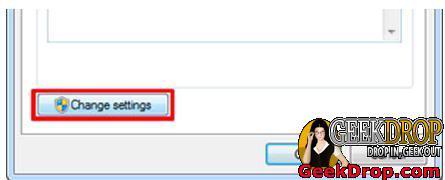
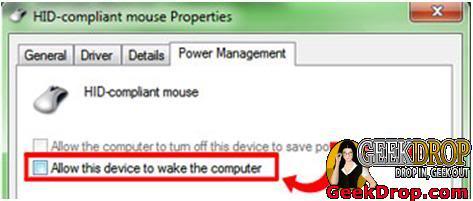
Click the "Power Management" tab. If you don’t see it, then click the "Change Settings" button at the bottom of the Window.
Read More ...
- How Can I Remove the Sticky Coating on My Mouse?
- Mouse Scroll Wheel Only Recognizes Every Other Scroll? - [SOLVED]
- How Do Turn On Sony Vaio Touchpad??
- Firefox 16, can no longer middle mouse click to open links in a new tab!
- How to lock your mouse cursor within the Star Wars: The Old Republic game window when using multiple monitors
- Zoom Using the Scroll Wheel
- Mouse move event
- How To Access The Right Click Menu Option Without A Mouse
- Hide Your Mouse Pointer While Typing
- Mouse Keeps Losing Connection

- 4329 reads

Who's New


Recent comments
1 week 6 days ago
1 week 6 days ago
2 weeks 49 min ago
2 weeks 4 days ago
2 weeks 4 days ago
4 weeks 20 hours ago
4 weeks 1 day ago
7 weeks 3 days ago
1 year 17 weeks ago
1 year 39 weeks ago