
Cool Tip To Auto-select The Private Checkbox In The Del.icio.us Firefox Addon
MalwareBytes is GeekDrop's Favorite Anti-Malware Solution
Act now to get a huge savings on GeekDrop's favorite Backup, Imaging, & Drive Utilities. Also our member's #1 choice!


I'm a personally a huge fan of Del.icio.us, and it's Firefox addon. I don't even use the regular Bookmarks option in my browser anymore and use that instead. That way I have access to all of my bookmarks, tagged, from anywhere I want.
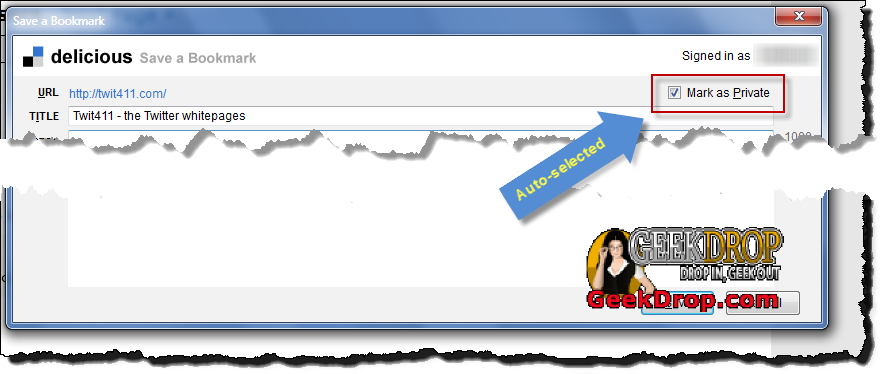
Anyway, one thing about the addon that has always irked me is that I had to manually check the "Mark as Private" checkbox every single time I added a new bookmark, since I like to keep all of mine private. But no mas! Here's a slick tip on setting up the addon to automatically check the Mark as Private for you.
If you don't have the Del.icio.us addon already, grab it here: Clicky
Then just follow these easy steps:
- Start Firefox if it isn't already running
- Type "about:config" in the URL/Location bar
- Right-click anywhere in the page
- Select New->Integer
- Type in "[email protected]"
- Enter "1"
All done! from now on whenever you add a new link with the Del.icio.us addon, it'll have the "Mark as Private" checkbox automatically checked (as seen in the example screenshot below). How sweet is that?
Read More ...
- No more ads on your websites
- Firefox is EXTREMELY laggy when Flash videos are playing!
- Firefox 16, can no longer middle mouse click to open links in a new tab!
- How can I set my Firefox to automatically use a certain profile?
- Firefox freezing until I move my mouse to the tab bar?
- Nice Free App to Speed Up Firefox In Windows and Mac
- How To Temporarily Bypass Your Browser's Cache To See The Latest Version Of A Page
- Ever turn off your menu bar in Firefox? I did..
- Coming Soon "Tab Candy" For Firefox
- Firefox 4 Beta

- 4058 reads

Who's New


Recent comments
2 weeks 2 days ago
4 weeks 5 days ago
4 weeks 5 days ago
4 weeks 5 days ago
5 weeks 3 days ago
5 weeks 3 days ago
6 weeks 6 days ago
7 weeks 18 hours ago
10 weeks 1 day ago
1 year 20 weeks ago