
MySpace

login
Sun, 03/08/2009 - 11:35pm — loomis1031has anyone else had problems trying to login on ms today? i keep getting this message: The function that you are currently trying to use is disabled and will be back shortly.
We are making some minor changes to this section so please bear with us until we can get it back online.
Please do NOT email me about this. Just wait it out. Mar 9, 2009 -Tom
- 4 comments
- 2073 reads
- quote

Myspace Phishing Notice
Fri, 03/06/2009 - 2:11am — U2This is something new for me to have happen and honestly I have never seen it before.
I have a friend who I am making a surprise for on blogger.com. I am trying to notifiy everyone about this, its a surprise for this person, I am doing it through myspace mail.
When I go to send out the email about the blogger.com page with the link to it, I get a notice saying "this email didn't pass the spam filter" then I go to my main myspace page and it says my profile might have been phished and change my password.
- 9 comments
- Read more
- 2048 reads
- quote
changing playlists
Thu, 03/05/2009 - 1:22am — loomis1031does anyone know how to change playlists on the ms player? i've got 2 and want to switch to the new one, i can't get it to change over. thanks!
- 2 comments
- 1709 reads
- quote

Myspace: "Friend Me"
Wed, 03/04/2009 - 2:41pm — Smartmom
- 9 comments
- Read more
- 2168 reads
- quote
how to display my 2.0 headline
Wed, 03/04/2009 - 3:58am — loomis1031ok, i made the switch over to 2.0 to test some "things" out, but i can't seem to get my headline to display! what am i doing wrong? where do i change my profile to display this? thanks!
- 8 comments
- 2096 reads
- quote
Change your "Details" on myspace
Sun, 02/15/2009 - 4:31pm — SmartmomJust below your "heroes" section is your Details section where you answer the basic myspace questions: Status, orientation...blah blah blah. How boring well now you can change them....
At the very top of your "about me" place this code:
</div>
<style>.hide {visibility:hidden; display:none;}</style>
Then at the bottom of your "Heroes" section place this code:
- 5 comments
- Read more
- 2344 reads
- quote
Codes to change your Myspace profile
Sun, 02/15/2009 - 3:49pm — SmartmomHere are some simple codes to change the way your myspace looks:
If you would like to hide your age, sex and location along with last long in date then paste this code at the end of your headline:
"<font style="display:none;">
NOTE: if you have a tracker in your headline this has to go AFTER or your tracker will not work.
How to resize a picture in Myspace
Sun, 02/15/2009 - 1:17am — SmartmomBasically this is a simple URL change to make a picture that was small larger. Say you see a person who is not your friend so you dont have access to their Myspace however you can see the tiny thumbnail of the picture that you would like to see in the full size. Its just a simple change of the URL and woo la you can see it larger.
- 3 comments
- Read more
- 2701 reads
- quote
Backgrounds on Private Myspaces
Sat, 01/31/2009 - 7:58am — SmartmomOk here is how to do a private profile page fancy. What is a fancy private profile?
This is the basic standard private profile (this is MY profile)
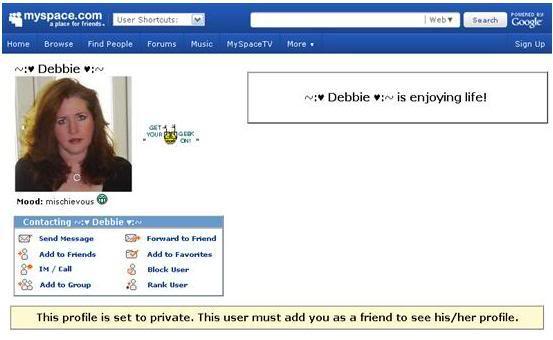
This is a private profile with a background added (this is a friends profile):
- 4 comments
- Read more
- 2104 reads
- quote
Preventing Firefox's No Page Style From Viewing Your Friends
Tue, 01/27/2009 - 10:21am — SmartmomPut this at the end of your "I'd like to meet section"
<span class="text"><noembed></style></span>
Who's New


All contents ©Copyright GeekDrop™ 2009-2026
Recent comments
5 days 19 hours ago
3 weeks 1 day ago
3 weeks 1 day ago
3 weeks 1 day ago
3 weeks 6 days ago
3 weeks 6 days ago
5 weeks 2 days ago
5 weeks 3 days ago
8 weeks 4 days ago
1 year 19 weeks ago