Help Community Login/Join:  
We're Playing "Dumbfound the DoGG!"

Join in!

How to format an External Hard Drive or Flash Drive


3 replies [Last post]
smartmom's picture
From:
is lost in cyberspace!
smartmom
User is online Online
Moderator (Watching Over The Masses)Joined the Dark SidePremium Member (Gold)I'm a Code Monkey!The Steel CurtainI use FirefoxI use Internet ExplorerI'm Here To Help, & Have Proven It!Linux UserWindows UserA Messiah (Leader of a popular GD Group)I'm a word nerd, read my blog! (5 Blogs)I donated more than $20+ to GeekDrop!I spend all day Photobucketing!Booga Booga BoogaI took a bite of the AppleI'm MagicThe JokerSTaRDoGG <3's you ;)
Joined: 01/15/2009
Posts: 5539
Drops: 7984
Mood: Giggly

So alot of the older External Hard Drives come formatted as FAT32 as does alot of flash drives.  What is the difference between the different formats?

Well, basically if it's formatted as FAT32 it will only allow files that are 4GB and under. If you format it as NTFS then you can add larger files to the drive. NTFS is also more stable, and gets fragmented less often, meaning better performance.

Some things, such as flash drives and external drives may not work on some computers if formatted as NTFS and then plugging into a FAT32 computer, and more and more, even devices like DVD players, such as the great one all of us GeekDroppers love, and televisons. FAT32 however can still work on NTFS computers. Most computers these days are Windows XP (using NTFS) or higher, so generally you're safe using NTFS, however you should be aware if this limitation anyway.

So what can you do if you have a drive that is formatted to FAT32 and you want or need to change it (or visa versa)?

First you should look to see how it's already formated.
Plug the external hard drive or flash into a USB port. Go to "my computer" (start > my computer) then find the new drive. Once you find it simply right click on it like this:

First you will want to go to "Properties" (see circled in red).  Click on "properties" and you will see this:
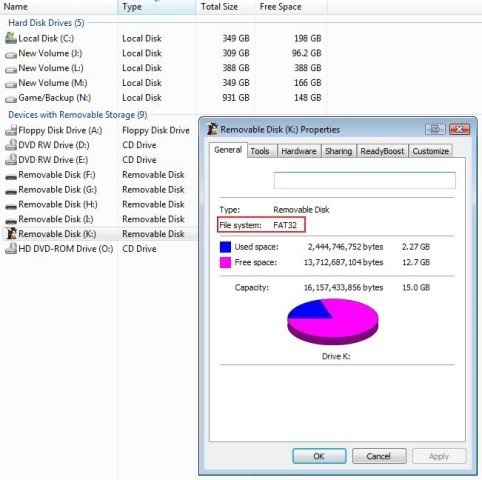
In the red box you will see how it is formatted. As you can see, this Flash Drive is formatted to "FAT32". Now if I wanted to reformat it to NTFS then I would go back to "my Computer" and right click on it (like in the first picture) and then choose the option "Format" (circled in green). Once you choose that you can change what format you would like to use:


Note: before you format a drive make sure any information you have stored on it is backed up to another drive because all data on the drive will be erased.
 

Comment viewing options

Select your preferred way to display the comments and click "Save settings" to activate your changes.
somewhere over the rainbow's picture
somewhere over ...
User offline. Last seen 1 day 16 hours ago. Offline
Joined the Dark SidePremium Member (Gold)I'm a Code Monkey!The Steel CurtainI use FirefoxI use Internet ExplorerI use SafariI'm Here To Help, & Have Proven It!Mac UserWindows UserI donated more than $20+ to GeekDrop!I took a bite of the AppleSTaRDoGG <3's you ;)Happy Birthday! (Cake)Happy Birthday! (Candles)
Joined: 03/03/2009
Posts: 258
Drops: 501
Mood: Mischievous
Re: How to reformat a External Hard Drive or Flash Drive
This is really excellent information! I ran into this a while ago when I tried to copy over to my external hard drive a movie and I kept getting an error message. I had no idea that FAT32 would only support 4GB and under.  I was advised to convert it to NTFS and did so with no problems at all!
 
smartmom's picture
From:
is lost in cyberspace!
smartmom
User is online Online
Moderator (Watching Over The Masses)Joined the Dark SidePremium Member (Gold)I'm a Code Monkey!The Steel CurtainI use FirefoxI use Internet ExplorerI'm Here To Help, & Have Proven It!Linux UserWindows UserA Messiah (Leader of a popular GD Group)I'm a word nerd, read my blog! (5 Blogs)I donated more than $20+ to GeekDrop!I spend all day Photobucketing!Booga Booga BoogaI took a bite of the AppleI'm MagicThe JokerSTaRDoGG <3's you ;)
Joined: 01/15/2009
Posts: 5539
Drops: 7984
Mood: Giggly
Re: How to reformat a External Hard Drive or Flash Drive

That is the same way I learned - I tried to back a movie up on the external and it wouldn't.  I know it use to be standard that flashes and externals came auto FAT32 now they tend to make them NTSF

 
LBL's picture
From:
Houston, TX
LBL
User offline. Last seen 2 weeks 1 day ago. Offline
Joined the Dark SidePremium Member (Gold)I use FirefoxMac UserWindows User
Joined: 03/03/2009
Posts: 253
Drops: 317
Mood: Happy
Re: How to reformat a External Hard Drive or Flash Drive

I'm gonna have to check this out when I get home.  I have a newer external drive with 1 TB on it, but I'm getting into making home videos, so this may apply.

All contents ©Copyright GeekDrop 2009-2010